cybersecurity
Business Continuity Planning for Hampton Roads Small Businesses (Plus a Free Template)
A business continuity plan for Hampton Roads small businesses has to account for hurricane season, tidal flooding, and storm outages. Includes a copy-and-use checklist, RTO/RPO explained, and disaster recovery comparison.

If you run a small business anywhere else in the country, a business continuity plan is a good idea. If you run one in Chesapeake, Norfolk, Virginia Beach, or anywhere else in Hampton Roads, it is closer to a necessity, because this region gets tested in ways most of the country does not.
Hurricane season runs June through November. Nor’easters show up in the winter months and can knock out power for days. Large parts of Hampton Roads, including low-lying areas of Norfolk and Chesapeake near the Elizabeth River and Southern Branch, deal with recurrent tidal flooding that has nothing to do with a named storm at all. Add a regional grid that strains under storm load, and you get a specific, recurring answer to the question “what actually knocks small businesses offline around here”: weather, more often than not.
A business continuity plan is the answer to a simpler question underneath all of that: if something knocks out a critical system tomorrow, whether it is a storm, a ransomware note, or a fire, what happens next, and who does it?
Most small businesses in this region do not have an answer. They have backups (maybe), an IT contact’s phone number, and an assumption that things will probably work out. That assumption holds until a nor’easter takes out power to three ZIP codes for four days.
This article covers the difference between continuity and disaster recovery, what RTO and RPO actually mean in plain terms, what happens when Hampton Roads businesses skip this step, and a template you can start filling out today.
What Is a Business Continuity Plan, and Is It the Same as Disaster Recovery?
A business continuity plan (BCP) and a disaster recovery plan (DR) are related, but they are not the same document, and mixing them up is where a lot of small businesses go wrong.
Disaster recovery is the IT piece. It answers: how do we get systems, servers, applications, and data back online after an outage? DR is technical. It lives in backup configurations, failover servers, and restore procedures.
Business continuity is bigger. It answers: how does the business keep operating, at all, while systems are down? That includes IT, but it also includes people, communication, physical space, and vendors. If your office floods during a nor’easter, DR gets your data back. Continuity covers where your team works tomorrow morning, how you tell customers you’re still open, and who signs checks if your accountant can’t get into the building because the parking lot is underwater.
Think of it this way: DR is one chapter inside the continuity plan. A business with excellent DR but no continuity plan can restore every server perfectly and still miss payroll, lose a key client relationship, or fail to notify anyone what’s happening. A lot of “BCDR” vendor pitches blur this line on purpose, because selling backup software is easier than talking through how your business actually keeps functioning during a bad week.
For most small businesses in Hampton Roads, whether you’re a Norfolk professional services firm or a Chesapeake contractor, the honest starting point is this: you probably have some disaster recovery capability already, even if it’s informal. You probably do not have a continuity plan, and you almost certainly do not have one built around the specific ways this region loses power and access. That gap is what this article is about closing.
What Does a Business Continuity Plan Include for a Small Business?
A usable business continuity plan for a small business does not need to be a hundred-page document. It needs five things, and most owners can build a working first draft once they see the list.
A short business impact analysis. This is just an honest look at what actually stops the business if it goes down: email, your line-of-business software, phones, a shared drive, a specific vendor. List your top five to ten critical processes and what breaks if each one fails for a day, then for a week.
Recovery priorities with real numbers attached. This is where RTO and RPO come in (more on that below). Not every system needs to be back in an hour. Some can wait a day. Deciding that in advance, instead of during a crisis, is the entire point.
A communication plan. Who calls who? If the office is unreachable, how does staff get instructions? How do customers and vendors get notified, and who is authorized to say what? Write down names, backup names, and phone numbers, not just job titles. Job titles don’t answer their phones, and cell towers on generator power for a hurricane’s first 24 hours don’t always cooperate either.
An alternate operating plan. Where does the team work if the office is unusable, whether that’s storm damage, a multi-day power outage, or an evacuation order for a coastal zone? What’s the minimum tech stack needed to keep taking orders, answering calls, or dispatching a crew? This doesn’t need to be elaborate. It needs to exist before you need it.
A vendor and dependency list. Who is your ISP, your payroll provider, your core software vendor, your bank, your generator fuel supplier? What’s their support number, and what’s your account number? During an actual incident, hunting for a vendor’s phone number in someone’s inbox costs hours you don’t have.
Helix Stax builds this alongside Cybersecurity & Compliance and Backup & Disaster Recovery work because the technical backbone, backups, failover, tested restores, has to exist before the plan means anything on paper.
Business Continuity Plan Template: A Checklist You Can Actually Use
This is the part most business continuity plan template guides skip: something you can fill out today, not after you hire a consultant. Copy this list into a document, put a name next to each blank, and you have a working first draft.
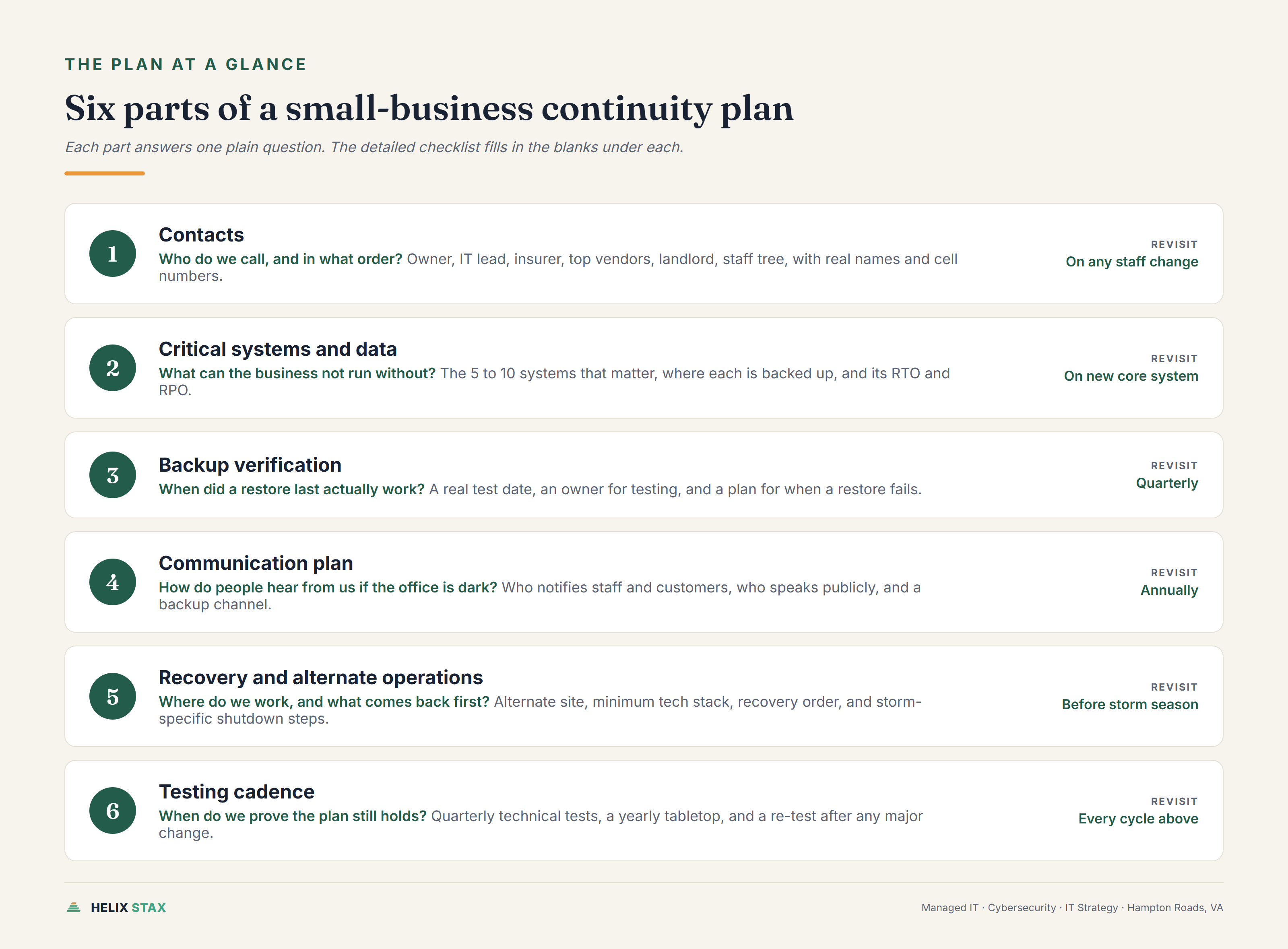
Contacts
- Owner or decision-maker, primary and backup, with cell numbers
- IT provider or internal IT lead, emergency contact number
- Insurance agent and policy number (property and cyber)
- Top 3 vendor support lines (ISP, payroll, core software)
- Landlord or property manager, if you lease your space
- Key employee call tree, one page, names and numbers only
Critical systems and data
- List of the 5-10 systems the business cannot run without
- Where each system’s data is backed up, and how often
- Confirmation that backups are stored off-site or off-network from the primary location
- RTO (how fast it needs to be back) for each critical system
- RPO (how much data loss is tolerable) for each critical system
Backup verification
- Date of the last successful restore test (not just a green status light)
- Who is responsible for testing restores, and how often
- What happens if a restore test fails
Communication plan
- Who notifies staff, and how, if the office is unreachable
- Who notifies customers, and what the message says
- Who is authorized to speak publicly or to media
- A backup communication channel that doesn’t depend on office phones or a single cell carrier
Recovery and alternate operations
- Where the team works if the physical office is unusable
- Minimum tech stack needed to keep operating (laptop, hotspot, phone forwarding)
- Step-by-step recovery order: what gets restored first, second, third
- Storm-specific steps: when to shut down and secure equipment ahead of a hurricane watch, and who makes that call
Testing cadence
- Quarterly: technical test (backup restore, failover check)
- Annually: full tabletop exercise with the people who’d actually respond
- After any major change: new vendor, new core system, new key employee
This checklist will not cover every edge case for every business. It covers the 80% that matters for most small operations in this region, and it gives you a real first draft instead of a blank page.
What Are RTO and RPO, and Why Do They Actually Matter?
If you’ve never heard the terms RTO and RPO, you’re not behind. Most small business owners haven’t, and the terms sound more complicated than they are.
RTO (Recovery Time Objective) is how long your business can tolerate a system being down before the damage becomes serious. If your line-of-business software has an RTO of four hours, that means you’re deciding, in advance, that four hours of downtime is survivable, and anything longer starts to hurt.
RPO (Recovery Point Objective) is how much data you can afford to lose, measured in time. If your RPO is 24 hours, that means your backup runs once a day, and if something fails right before the next backup, you lose up to a day’s worth of work. If your RPO is 15 minutes, you need backups running much more frequently, and that costs more.
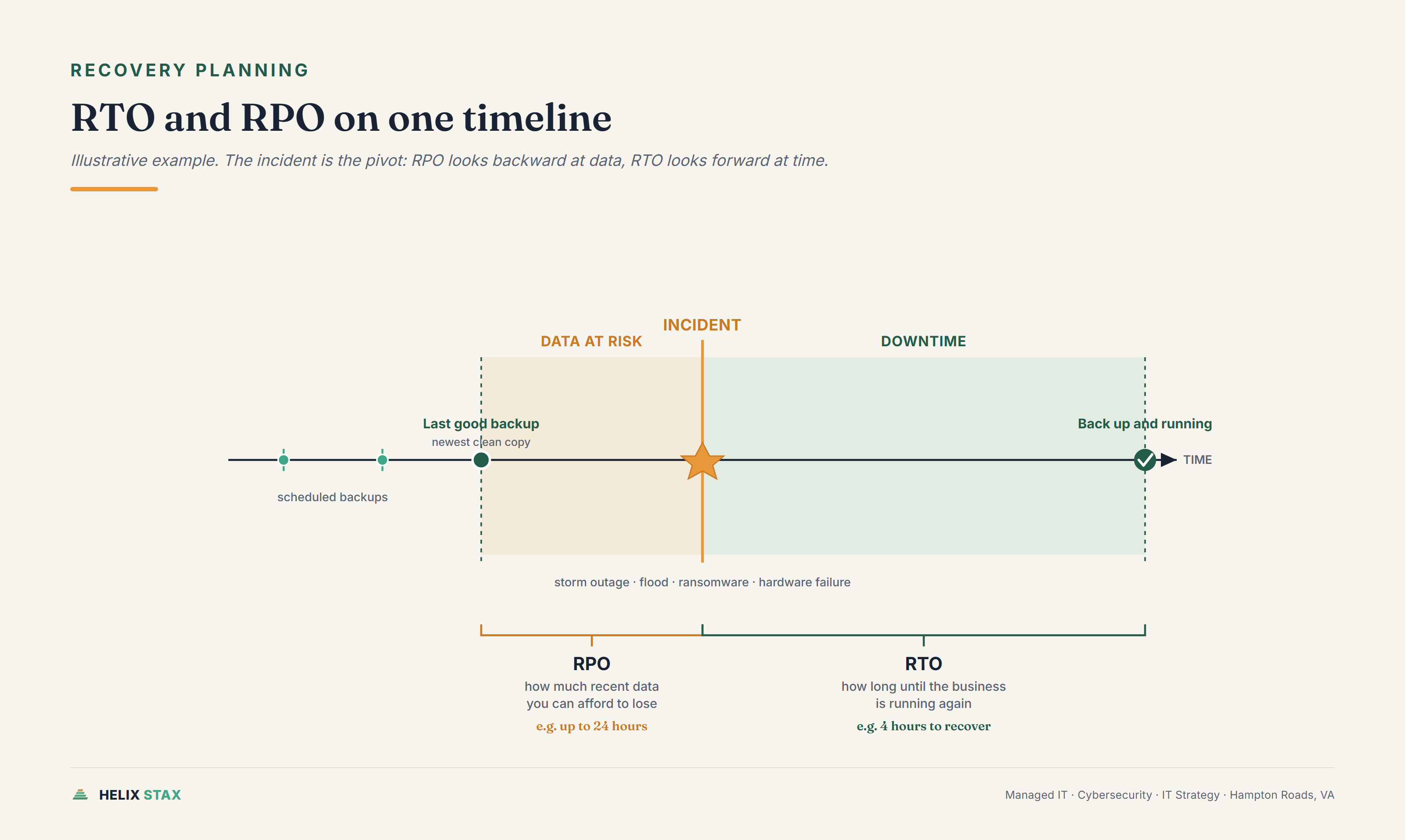
Here’s why these numbers matter more than most owners assume: they are the difference between a plan and a guess. Without an RTO, “how fast do we need to be back up” is answered in the moment, under pressure, by whoever’s in the room. Without an RPO, you find out how much data you lost only after it’s already lost.
A simple example. A Chesapeake HVAC company might decide their dispatch software needs an RTO of two hours (calls have to keep getting scheduled, including storm-related emergency calls, which spike right when a hurricane passes through) but their archived project photos can have an RTO of a week (nice to have, not urgent). Their accounting data might need an RPO of one hour, because losing a day of invoices is a real financial hit, while their marketing files can tolerate a 24-hour RPO with no real consequence.
Not every system gets the same numbers, and that’s the point. RTO and RPO force a conversation that most businesses never have until they’re forced to: what actually matters most, and what’s just noise.
What Happens to Hampton Roads Businesses That Don’t Have a Plan? (Real Scenarios)
This isn’t a scare tactic section. It’s a look at the most common ways small businesses in this region actually get tested, and what tends to happen when there’s no plan in place.
A hurricane or major storm knocks out power for days. This is the scenario most specific to Hampton Roads, and it’s the one owners underestimate most. Power goes out. Cell service gets spotty as towers run on generator backup. If your only server sits in a closet at the office and your only internet is the office connection, you have no way to process orders, answer calls, or even confirm you’re still operating, until the power company gets to your block. Businesses with a plan already know which systems can run from a laptop and a hotspot, and which employee is checking in on generator status at the office.
Recurrent tidal flooding damages the office or the equipment inside it. This one is easy to underestimate because it feels rare, until a king tide combines with a storm surge and water is in the building before anyone expected it. A continuity plan doesn’t prevent the flood. It answers where the team works the next morning, how the phone system gets rerouted, and whether the data survived, because it wasn’t only sitting on a machine in the affected building.
Ransomware. Systems lock. Files carry a ransom note instead of their normal names. The immediate problem isn’t just “do we pay,” it’s that nobody knows what’s actually been encrypted, whether backups are clean, or how far the attacker got. Without a plan, the first few hours get spent figuring out who’s in charge of the decision, whether backups even restore, and what to tell customers who are calling because their invoices didn’t go out. Businesses with a tested DR plan and a communication tree skip most of that scramble.
A key employee leaves. This one gets missed constantly because it doesn’t look like a disaster. It looks like a resignation letter. But if one person is the only one who knows the payroll process, holds the only copy of vendor credentials, or is the sole point of contact for a critical client relationship, that person walking out the door is a continuity event. The fix isn’t complicated: document the process, share the access, cross-train a backup person, before it becomes urgent.
None of these require a large company to go wrong. They require exactly one missing piece: someone deciding, in advance, who does what.
Does Your Cyber Insurance Policy Require a Business Continuity Plan?
More policies are asking, directly or indirectly, and the trend is toward more scrutiny, not less.
Cyber insurance applications increasingly include questions about backup frequency, backup testing, incident response procedures, and recovery time expectations. Some carriers ask outright whether you have a documented continuity or disaster recovery plan. Others ask questions that only make sense if you already have one: “What is your recovery time objective for critical systems?” is not a question you can answer well without having gone through the RTO exercise above.
This matters at two points. At renewal, vague or incomplete answers can mean higher premiums, added exclusions, or a declined policy. After an incident, if a claim gets filed and the carrier discovers the application answers didn’t match reality, coverage can be challenged. Insurers are not asking these questions to be thorough for its own sake. They’re pricing risk, and an untested plan is a real risk even if it looks fine on paper. Coastal-area businesses in particular tend to draw more questions about power resilience and physical site risk.
If you’re not sure how your current setup would hold up against a security questionnaire, that’s worth checking before a renewal deadline forces the issue. Our Cybersecurity for Small Business Guide covers the baseline controls insurers usually ask about first: MFA, backup testing, and access control. Our cyber insurance requirements guide goes deeper on the specific questions carriers ask and how a continuity plan factors into underwriting.
How Much Does It Cost to Build a Business Continuity Plan?
These are industry ranges, not a Helix Stax rate card. We scope actual pricing after looking at your environment, because a five-person office and a fifty-person operation with three vendors and a compliance requirement are not the same project.
For a very small business willing to do the work internally, the cost is mostly time: a few hours to run through the business impact analysis, list critical vendors, fill out the checklist above, and confirm backups actually restore. The tools you likely already have (a shared document, your existing backup software) can carry a basic plan.
For a professionally built plan, expect a project scope similar to a focused IT assessment: a business impact analysis, RTO/RPO decisions by system, a documented recovery procedure, and one tabletop test to confirm it holds up. Depending on the number of systems and locations involved, this tends to land as a fixed-fee project rather than an ongoing monthly cost, often in the same range as a mid-size security assessment.
Ongoing costs come from testing, not documentation. A plan that’s written once and never tested is not really a plan, it’s a document. Budget for at least one test per year, more often if your systems or staff change frequently, and consider a pre-hurricane-season check every spring given where you’re located.
The honest comparison isn’t the cost of the plan. It’s the cost of the outage the plan is meant to shorten. Our Managed IT Services Cost article breaks down what a day of downtime actually costs most small businesses, and that number usually makes the planning cost look small by comparison.
Can a Managed IT Provider Help Build and Test Your Plan?
Yes, and for most small businesses this is where the plan actually gets built, because the technical half of continuity, backups, failover, tested restores, is already the provider’s job.
A managed IT provider brings three things to this work that are hard to do well internally. First, they already know your environment: what systems exist, where backups run, and what actually breaks when something fails, because they’re the ones fixing it when it does. Second, they can run a real restore test instead of trusting that a backup dashboard showing green means the data will actually come back. A backup that’s never been restored is a guess with a status light. Third, they can facilitate the tabletop exercise itself, walking your team through “the power’s been out for three days, what do we do” without your operations lead having to also be the one running the meeting.
What a provider generally can’t do alone is the business side: who calls which customers, what gets said publicly, who’s authorized to make a six-figure decision under pressure. That part needs your leadership team in the room. The plan works best as a joint effort: the provider owns the technical recovery piece, your team owns the business decisions, and the document ties both together.
Helix Stax works out of Chesapeake and serves small businesses across Hampton Roads, which means the storm and flood scenarios in this article aren’t hypothetical. They’re the same conditions we plan around for our own operations.
If you’re not sure whether your current backups would actually hold up under a real test, that’s the first thing worth finding out, before you write a single page of the plan itself. Start with the Free IT Assessment. Sixty minutes, no pressure. You’ll leave knowing whether your recovery point is what you think it is, and if a full continuity plan makes sense, we’ll tell you what that project should include before anyone talks about cost.
Frequently asked questions about Helix Stax managed IT services
A basic plan covering your top five critical processes, a communication tree, and a tested backup can be drafted in one to two weeks if someone owns the project. A full plan with a formal business impact analysis, vendor contingencies, and a tested failover usually takes four to eight weeks, mostly because testing and documentation take longer than writing.
Yes, in effect. NIST SP 800-171, the control set behind CMMC Level 2, includes contingency planning requirements: incident response, system backup, and recovery procedures. You do not need a separate document labeled 'Business Continuity Plan,' but the underlying practices, tested backups, a recovery process, and documented roles, have to exist and hold up under assessment.
Test the technical pieces, backup restores and failover, at least quarterly. Run a full tabletop exercise, walking through a scenario with the people who would actually respond, at least once a year, and again any time you change core systems, vendors, or staff in continuity-critical roles.
No, one plan covers both if it is built around impact instead of cause. A ransomware attack and a hurricane-driven power outage produce the same core question: which systems are down, and how does the business keep running until they are back? Your business impact analysis and RTO/RPO decisions stay the same either way. What changes is the trigger and the specific response steps, which is why the checklist below has a slot for storm-specific actions.