ai-automation
AI Automation for Small Business in Hampton Roads: Where to Actually Start
AI automation for small business works best on narrow, repeatable tasks. See where business process automation pays off for Hampton Roads companies, where it does not, and how to start without a developer.

Every small business owner in Hampton Roads has heard the AI automation pitch by now. Fewer have seen it actually save anyone time.
That gap is not because the technology is fake. It is because most AI automation advice is written for companies with developers on staff, six-figure software budgets, or both. If you run a 15-person business in Suffolk, Norfolk, or anywhere else along the Hampton Roads waterfront with no in-house engineer, most of that advice is useless to you. You are left with a vague sense that you are “behind” and no clear next step.
Here is the honest version. AI automation for small business works when it is applied to narrow, repeatable, well-defined tasks, whether that business is a Suffolk govcon subcontractor, a Portsmouth trades shop, or a professional practice off I-64. It does not work as a blanket strategy, and it is not a replacement for basic IT hygiene you have not fixed yet. If your backups are not tested and MFA is not turned on everywhere, fix that first; our cybersecurity for small business guide covers where to start. This guide walks through where the real ROI is for Hampton Roads businesses specifically, where it is not, what it costs, and how to start without hiring a developer. If you want a second opinion on your own setup first, our Suffolk IT services page covers what a local assessment looks like.
What does “AI automation” actually mean for a small business?
For a small business, AI automation means using software (often built on large language models) to handle a specific, repetitive task that currently eats up someone’s time: reading an email and pulling out the invoice number, summarizing a meeting, routing a support ticket to the right person, drafting a first-pass reply.
It does not mean replacing your accounting system. It does not mean a chatbot that “understands your whole business.” Most of the value in small business automation comes from connecting tools you already have (email, a CRM, a shared drive, a scheduling tool) with a small layer of logic that handles the part a person used to do by hand.
Three things separate real automation from AI theater:
- A clear trigger. Something specific happens (an email arrives, a form is submitted, a ticket is created) and the automation responds. If you cannot name the trigger, you do not have an automation plan yet, you have a wish.
- A bounded task. The AI does one job, not “help with customer service.” Summarize this call. Categorize this ticket. Extract these five fields from this document.
- A human checkpoint somewhere. Early on, someone reviews the output before it goes out the door or into a system of record. That checkpoint is what makes the automation trustworthy, and it is usually where the first version of the automation earns its keep.
If a vendor pitches you a platform instead of a task, ask them to name the trigger and the bounded job. If they cannot, you are buying a demo, not a solution.
Which business tasks are actually worth automating first?
Start with tasks that are high-frequency, rule-based, and currently done manually by someone whose time costs more than the automation. This is what business process automation actually means in practice, not a platform, a specific task moving from manual to automatic. Here is where that shows up across the kinds of businesses we see most in Hampton Roads, with real examples instead of categories.
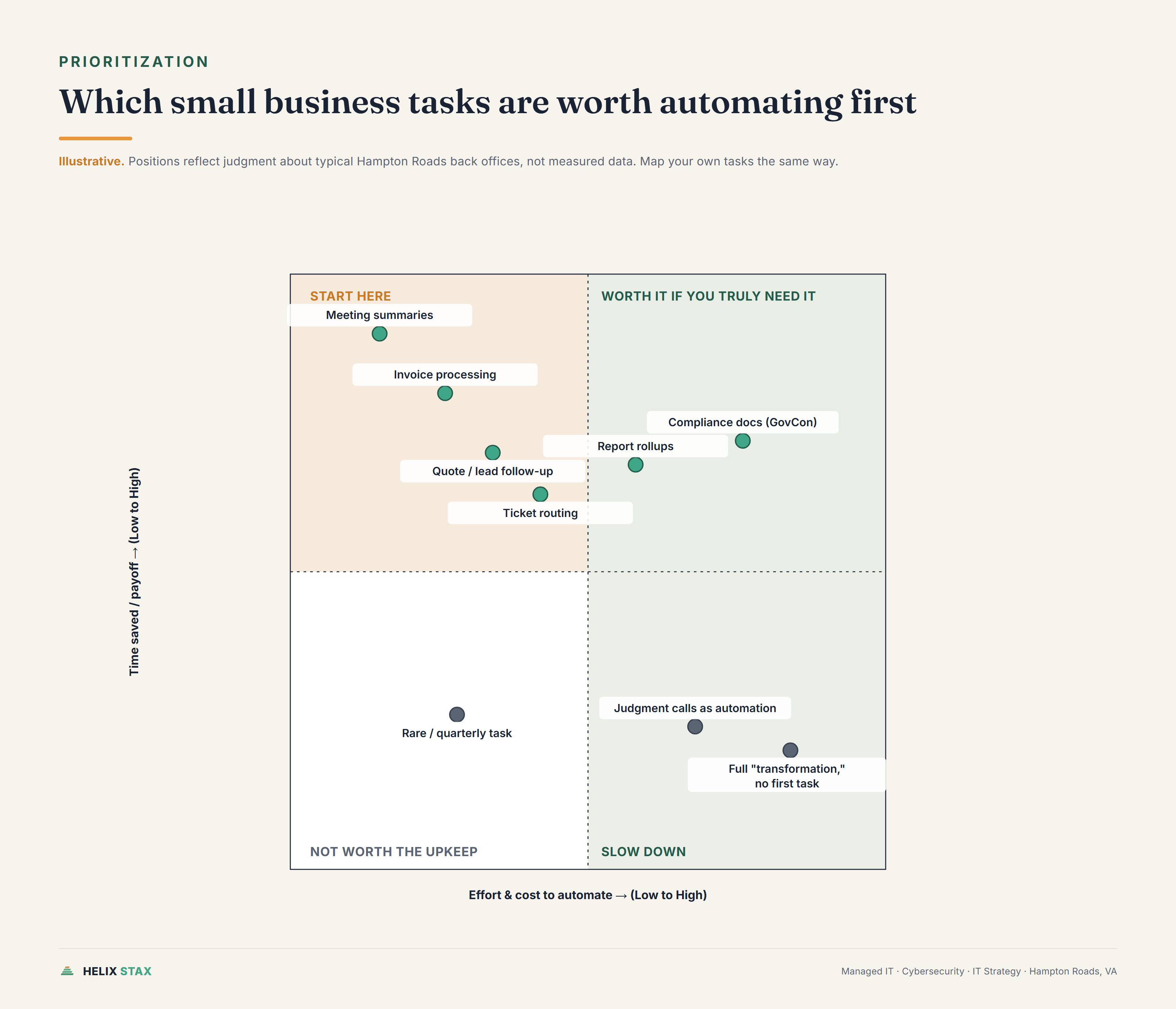
Invoice processing and quote follow-up for trades and field-service businesses. An HVAC contractor in Chesapeake or a landscaping crew working Suffolk and Isle of Wight County has someone opening a PDF or photo of a receipt, typing the vendor, amount, and category into QuickBooks, and filing it. The same office is often chasing quotes that went quiet after a week. This is close to the ideal automation candidate: the format is semi-structured, the fields are consistent, and the volume is steady. A well-built automation reads the invoice, extracts the fields, drops them into your accounting tool with a flag for anything it is not confident about, and can nudge a stalled quote with a follow-up draft for a person to send. Quote and lead follow-up specifically overlaps with marketing and sales automation, since the trigger (a quote goes quiet) and the task (draft a nudge) are the same pattern whether the lead came from a call or a web form.
Compliance documentation and contract admin for GovCon subcontractors. A Suffolk or Newport News firm working under a prime contractor generates a steady stream of internal admin: tracking deliverable due dates, drafting status report language from a template, assembling evidence for a CMMC self-assessment. None of that requires touching Controlled Unclassified Information directly, and it is exactly the kind of repeatable paperwork an automation can draft a first pass of while a person reviews for accuracy.
Back-office automation for port and maritime logistics operations. Freight forwarders, ship chandlers, and trucking dispatchers working the Port of Virginia corridor deal with a steady flow of bills of lading, container status updates, and carrier paperwork that someone currently re-keys by hand from an email or PDF into a tracking spreadsheet. That re-keying step, not the shipping decision itself, is the part worth automating first.
Meeting summaries for local professional practices. If an accountant, attorney, or consultant in a Norfolk or Virginia Beach practice spends 20 minutes after every client call writing up notes and next steps, that is time an automation can claim back. The AI drafts the summary and action items from the call recording or transcript; a person skims it and sends it. This is one of the fastest wins because the review step takes seconds and the time saved is immediate.
Ticket and inquiry routing. If your team gets a mix of billing questions, support requests, and sales inquiries into one inbox or ticketing tool, an automation can read the message, classify it, and route it to the right person or queue. This does not eliminate the person who answers the ticket. It eliminates the person who used to read every ticket just to figure out who should answer it.
Report assembly. Pulling numbers from three systems into a weekly ops report is exactly the kind of task nobody enjoys and everybody puts off. Automating the data pull and first-draft summary, with a person adding commentary, turns a two-hour Friday task into a fifteen-minute review.
Notice what these have in common: a person was already doing the task, doing it the same way each time, and doing it often enough that the time adds up. That is the pattern to look for in your own operation before you look at any vendor’s feature list.
Here is where AI automation probably does not make sense yet
Most of what gets marketed as “AI transformation” is not worth pursuing for a small business right now, and it is worth saying that plainly.
Anything that happens rarely. If a task happens twice a month, the time you spend building, testing, and maintaining the automation will outweigh what it saves. Automate the daily and weekly grind, not the quarterly exception.
Anything where the input format keeps changing. If every vendor sends invoices in a different layout, or every client email is phrased completely differently, the automation will need constant babysitting. It can still be done, but budget for more setup and more review time up front.
Judgment calls dressed up as automation. Deciding whether to extend credit to a customer, how to respond to an angry complaint, or which candidate to hire is not a task an AI tool should own outright. It can draft a starting point. It should not make the call.
Full “digital transformation” projects with no defined first task. If the plan is to automate “customer service” or “operations” as a whole, stop. That is not a project, it is a slogan. Pick one task inside that department and prove it works before touching the next one.
Automating a broken process. If your intake process is a mess of emails, sticky notes, and someone’s memory, automating it just makes the mess move faster. Fix the process first, even if that fix is as simple as a shared form. Then automate the clean version.
If a consultant tells you everything is ready for AI automation, be skeptical. The honest answer is usually that two or three things are ready and the rest needs cleanup first.
What ROI should you realistically expect, and when?
The realistic version of ROI is time saved on a specific task, multiplied by how often that task happens, minus what the automation costs to build and run.
A meeting-summary automation that saves one person 20 minutes after every client call, across 15 calls a week, is roughly five hours a week back. At a fully loaded cost of $35 an hour, that is around $175 a week, or over $9,000 a year, against a tool that might cost $50 to $150 a month once it is running. That math is simple on purpose. Do this exercise with your own numbers before you commit to any automation, and be honest about how much time the task really takes today, not how much time it should take.
Invoice processing and ticket routing tend to follow a similar shape: modest monthly software cost, a one-time setup cost, and a return that shows up within the first one to two months if the volume is real.
Where the ROI story gets murky is anything with a vague scope. “Improve customer experience with AI” has no clear before-and-after number. “Cut the time to log and categorize an invoice from four minutes to thirty seconds” does. Insist on the second kind of statement before you approve a project, whether you are working with Helix Stax or anyone else.
Timing matters too. Narrow automations (the invoice reader, the ticket router, the meeting summarizer) tend to show results inside two weeks of going live, because the task itself is short and the volume is high enough to see a pattern quickly. Automations that span multiple systems or require staff to change a habit take longer, usually four to eight weeks, because part of the “ROI” is people trusting the new process enough to stop doing it the old way in parallel.
Be wary of ROI projections with no time frame attached. If a proposal cannot tell you roughly when you should expect to see the savings, it has not been thought through past the sales pitch.
Do you need a developer, or can you start without one?
You do not need a developer to get real value from automation. You do need someone who understands your workflow well enough to define the trigger, the task, and the checkpoint clearly, and who knows the tools well enough to wire them together without creating a fragile mess.
There are three realistic paths for a small business:
No-code and low-code platforms. Tools like Zapier, Make, and n8n let you connect email, forms, spreadsheets, and AI models without writing code. These work well for straightforward automations: when this happens, do that. The limitation is complexity. Once an automation needs to handle a lot of edge cases or talk to a system with no existing connector, no-code tools start to strain.
A managed automation partner. This is where a firm like Helix Stax typically comes in: mapping the actual workflow, picking the right tool for the job (sometimes no-code, sometimes custom), building it, and maintaining it so it does not quietly break six months from now when a vendor changes their email format. This path costs more up front than DIY, but it removes the maintenance burden from your team, which matters if nobody in your office wants to become an unpaid automation admin. If you already outsource your helpdesk and network support, automation work often folds into that same relationship rather than requiring a separate vendor; see our breakdown of managed IT services cost for how that scope and pricing usually works.
Hiring or training an internal developer. This makes sense once you have five or more automations running and enough ongoing need to justify a full-time or fractional technical hire. For most businesses under 50 employees, this is premature. You will spend more on the hire than you would on a handful of well-built automations from an outside partner.
The honest starting point for most small businesses is path one or two: pick a single task, use a no-code tool or a partner to build it, watch it work for a month, then decide whether to expand. Do not start by hiring anyone or signing a platform contract for “AI capability” in the abstract.
What is the difference between AI automation and just buying new software?
Buying software gives you a tool. Automation makes the tool act on your behalf without someone manually operating it every time.
If you buy a new CRM, a person still has to log in, read the lead, and decide what to do. That is software adoption, and it is worth doing, but it is not automation. If that same CRM is connected so that a new lead is automatically categorized, assigned to the right rep, and given a first-draft follow-up email waiting for approval, that is automation layered on top of the software.
This distinction matters because a lot of AI automation budget gets wasted buying a new platform when the real fix was connecting the tools you already had. Before buying anything new, ask whether the task can be automated using the software you already pay for. Most small businesses are sitting on unused automation features inside Microsoft 365, Google Workspace, or their existing CRM. A short assessment usually finds two or three of these before it finds a reason to buy something new.
New software is sometimes the right answer, particularly when your current tools genuinely cannot do the job or do not talk to each other at all. But “we need AI” should not be the reason you buy a new platform. “This specific task needs to move from manual to automatic” is a better reason, and it might not require buying anything.
What security and compliance risks should government contractors know about?
If you hold a DoD contract or handle Controlled Unclassified Information, AI automation is not off the table, but it changes the questions you need to ask before you automate anything.
The first question is not “is this a good automation idea.” It is “does this task touch FCI or CUI, and if so, where does the data go once the AI tool processes it.” A public AI chatbot or a consumer-grade automation platform may send your data to servers and systems that are nowhere near your CMMC boundary. That is a real problem even for a task that seems harmless, like drafting a report summary, if the source data included CUI. See our explainer on what CUI actually is if you are not sure whether your data qualifies.
The good news is that most of the automation opportunities in a typical GovCon back office are lower risk than people assume:
- Compliance documentation drafting. Pulling together evidence for a CMMC assessment, drafting policy language from a template, or assembling a POA&M first draft is largely internal admin work. It still needs review for accuracy, but the data involved is often about your controls, not classified program content.
- Contract administration. Tracking deliverable due dates, drafting status reports, and routing contract modifications for review are process tasks, not data-handling tasks, as long as the underlying documents do not contain CUI themselves.
- Reporting rollups. Assembling program status from multiple trackers into one weekly summary is a strong automation candidate, provided the source systems and the automation tool are both inside your approved boundary.
Where it gets genuinely risky is automating anything that reads, summarizes, or routes documents that contain CUI using a tool that has not been vetted for that purpose. That includes free or consumer AI tools, and it includes automation platforms that route your data through servers you do not control or have not reviewed.
The practical rule: automate the admin work around your compliance program freely. Before automating anything that touches CUI directly, confirm where the tool processes and stores data, and whether that fits inside your existing CMMC scope. If you are not sure, that is a conversation to have before you build the automation, not after. Our CMMC requirements guide covers how FCI and CUI scoping works if you need the background first.
How do you pick the right AI automation partner?
Most of the risk in a small business automation project is not the AI model. It is picking a partner who oversells the vision and underdelivers the plumbing. A few questions separate a serious partner from a sales pitch.
Ask them to name the first task, not the platform. A good partner will ask about your actual workflow before recommending a tool. If they lead with a product demo before asking what eats your team’s time, that is a sign they are selling software, not solving a problem.
Ask what happens when it breaks. Automations fail quietly: a vendor changes an invoice template, an API updates, a field gets renamed. Ask who monitors for that and what the response time looks like. If nobody has an answer, you are the monitoring plan.
Ask for a number, not a vibe. “This will save you time” is not a proposal. “This will save your billing coordinator roughly six hours a week based on your current invoice volume” is a proposal you can hold someone to.
Ask about data handling directly, especially if you touch CUI, financial data, or health records. Where does the data go. What tool processes it. Is that tool inside or outside your compliance boundary. A partner who cannot answer this clearly is not ready to work in a regulated environment, even if their automation skills are otherwise solid.
Start small on purpose. A partner who insists on a full “automation transformation” engagement before proving one task works is asking you to bet a large budget on unproven results. A partner willing to prove value on one task first, then expand, is telling you they are confident the work holds up.
This is also where a broader IT Projects & Automation engagement earns its cost. The value is not the automation itself. It is someone who already knows your environment, your compliance posture, and your existing tools well enough to say no to the automation ideas that would waste your money, and yes to the ones that will not.
If you are not sure which of your own tasks would actually pay off, that is a scoping conversation, not a sales pitch. Start with the Free IT Assessment. We will look at what your team does by hand every week and tell you honestly which parts are worth automating first, and which parts are not there yet.
Frequently asked questions about Helix Stax managed IT services
A single well-scoped automation, such as invoice processing or ticket routing, typically runs from a few thousand dollars to build and configure, with ongoing tool costs of $20 to $200 per month depending on volume. Broader automation programs that touch multiple departments cost more because they require mapping, testing, and change management, not just software.
Yes, but the tool and hosting decision matters more than the automation idea. Automating internal admin tasks like scheduling or reporting drafts is usually low risk. Automating anything that touches CUI requires checking where the AI tool processes and stores data, whether it meets your CMMC scope, and whether a public AI service is even allowed to see that data at all. When in doubt, keep CUI-adjacent work on approved, compliant systems and automate around the edges.
A narrow automation, like auto-drafting meeting summaries or routing support tickets, can show results within one to two weeks of going live. Automations that touch multiple systems or require staff to change how they work typically take four to eight weeks before the time savings are consistent and trusted.